/images/clemens.jpg

Hi! I'm Clemens Schotte,

Enthusiastic storyteller with a passion for technology

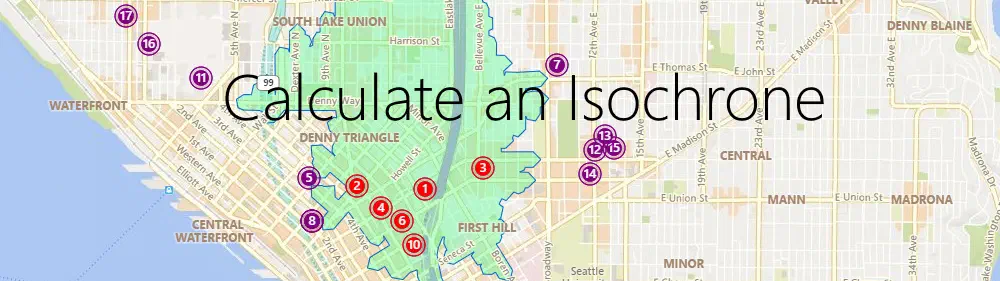
Use Azure Maps to calculate an isochrone to reach your customers

Imagine you are a store owner and would like to target customers that live within a 15-minute drive from your store with advertising for your weekly specials. You could draw a circle on a map, guessing that is about 15 minutes away, but it will not truly represent the time it will take for customers to get to your store. For example, a customer living near a major transit route can live further away from the store than a customer living in a less well-served part of the city. To meet this need, an isochrone is a polygon (an area on a map) of expected travel time. It represents the locations that will take the specified time, or less, it will take to get to a specific point (your store, in this case). Estimating an isochrone correctly, including all the variables like traffic, road, and vehicle conditions, is very hard to do by yourself!

Azure DevOps Dashboard

Introduction

When you are managing Azure DevOps in a large enterprise organization, and you are still using only one Azure DevOps organization account, you are probably hitting some limits or have potential performance issues. Microsoft’s recommendation is to have around 300 projects in a single Azure DevOps organization account. I have seen Azure DevOps organizations with more than 600 projects that still work.

The solution is to set up a multi-organization structure. Move all the inactive projects to an archive or boneyard Azure DevOps organization account and add an extra Azure DevOps organization account per department.

Do I get wet feet? Draw a flood map using Azure Maps Elevation

Introduction

When you are living in the Netherlands you are used to that, nearly 26% of its land falling below sea level, and about 50% is just only exceeding 1 m (3.3 ft) above. The Dutch people have lived many centuries battling the water, not only from the sea but also from her rivers. To protect the land the Dutch have built many sophisticated protecting- and management systems to handle the water, like the Delta Works. Building only a dike or dam is not enough. Today we have won, but we know that we cannot rust, climate change (heavy rain showers) and sea levels are rising globally. Do we (or you) get wet feet in the future?

Create your own indoor maps using Azure Maps Creator

Introduction

When you are working inside a building, like an office, factory, shopping mall, or something like a museum. There are probably a lot of sensors that can tell you information about that building, like what is the temperature and air quality per room, is there any door open or is there some alarm happening. When you in a big building and you want to know the fastest route to a specific room/store/painting, you probably apricate some help in navigating. These are all smart buildings.

Protect your web applications using Azure Application Gateway

What is Azure Application Gateway?

Azure Application Gateway is a reverse proxy with optional WAF (Web Application Firewall) capability to allow incoming connections from external sources. The Gateway operates at Layer 3, 4, and 7 for IP-based, TCP/UDP-based, URL-based, and Host Header-based routing.

/protect-your-web-applications-using-azure-application-gateway/azure-application-gateway.png

When to use the Application Gateway?

Microsoft has multiple services to protect and accelerate your applications; they are used for different scenarios, depending on where your users are:

Infrastructure as Code

Infrastructure as Code

Infrastructure as Code (IaC) is the process of managing and provisioning infrastructure and configuration dependencies for application stacks using machine-readable definition files rather than physical hardware configuration or interactive configuration tools.

What is Infrastructure as Code?

  • Source Controlled
  • In code (Scripts & Templates)
  • Automated & Continuous Deployment
  • Testing
  • Feedback loop (Monitoring)

Categories of IaC tooling

You can use many declarative infrastructure deployment technologies with Azure. These fall into two main categories.